Mens Kilt Outfit


How to Order Your Kilt Online
From choosing your tartan and measurements to adding accessories and completing checkout, follow our simple step-by-step guide to place your Mens Kilt Outfit order with confidence.
How To Place an Order on Mens Kilt Outfit
Ordering from Mens Kilt Outfit is easy and works just like ordering from any other online store. You can shop from your mobile phone, tablet, or laptop.
Follow these simple steps to place your order correctly.
Step 1: Choose Your Product Category
First, visit the Mens Kilt Outfit website and navigate to the category you want to shop from.
For example, if you are looking for a kilt, you can browse categories such as:
- Tartan Kilts
- Utility Kilts
- Custom Kilts
- Leather Kilts
- Kilt Outfits
- Jackets
- Sporrans
- Kilt Accessories
Simply open the category and browse the available products.
Step 2: Choose Your Kilt or Product:
Once you are inside the category, select the product you want to purchase.
Some products are available as individual kilts, while others may offer complete outfit options.
Choosing a Tartan
For products that offer tartan selection, you may see a large collection of tartan swatches.
We offer hundreds of tartan options across selected products.
Simply click on the tartan swatch you like. The tartan name will appear when you select the swatch, making it easier to identify your chosen tartan.
Take your time and make sure you have selected the correct tartan before continuing.
Step 3: Select Your Size and Measurements
After choosing your tartan, select your required size or enter the measurements requested on the product page.
Depending on the product, you may be asked for:
- Waist measurement
- Kilt length
- Other required measurements
- Size options
Make sure your measurements are entered correctly before adding the product to your cart.
Step 4: Choose Optional Add-Ons
Some kilt products include optional add-ons that allow you to customize your order.
Depending on the product, you may be able to select options such as:
- Matching sporran
- Fly plaid
- Kilt belt or belt buckle
- 8-yard kilt option
- Matching accessories
- Other available outfit additions
These options are generally optional. If you do not need an add-on, you can leave it unselected.
Step 5: Add The Product To Your Cart
Once you have selected your:
- Tartan
- Size
- Measurements
- Optional add-ons
review your selections carefully.
Then click “Add to Cart.”
Your selected product will be added to your shopping cart.
Step 6: Buying a Complete Kilt Outfit
If you want to purchase a complete outfit instead of only a kilt, select the available outfit options on the product page.
Choose your preferred tartan and enter your required kilt measurements.
Then select the accessories or outfit components available with the package, such as:
- Kilt
- Sporran
- Kilt belt
- Kilt buckle
- Fly plaid
- Kilt hose
- Kilt flashes
- Ghillie brogues
- Other available accessories
Before adding the outfit to your cart, check that you have selected all the items and options you actually want.
Then click “Add to Cart.”
Step 7: Buying Individual Products Separately
You can also build your own outfit by purchasing products individually.
For example, you may choose:
- A tartan kilt
- A kilt jacket
- A sporran
- A kilt belt
- A belt buckle
- Kilt hose
- Ghillie brogues
- A fly plaid
After selecting each product, click “Add to Cart.”
Then return to the shop and continue browsing until you have added everything you want to purchase.
You do not need to complete checkout after every product. You can add multiple products to your cart and check out once you have finished shopping.
Step 8: Open Your Shopping Cart
When you have finished selecting all your products, click the shopping cart icon.
Review your cart carefully and make sure:
- You selected the correct products
- Your tartan choices are correct
- Your sizes and measurements are correct
- Your optional add-ons are correct
- You have selected all the accessories you need
- The quantity of each product is correct
If everything looks correct, continue to checkout.
Step 9: Enter Your Shipping Information
At checkout, you will need to provide your shipping information.
Enter your information accurately, including:
- Full Name
- Street Address
- House or Apartment Number, if applicable
- City
- State/Province
- ZIP or Postal Code
- Country
- Phone Number
Important: Use Your Real Shipping Address
Please provide the physical address where you want your order delivered.
Double-check your address before placing the order. An incorrect or incomplete address can cause delivery delays or problems with your shipment.
Step 10: Enter an Active Email Address
Your email address is one of the most important parts of the checkout process.
Please use your personal, active email address that you check regularly.
Do not use a fake, temporary, or dummy email address.
We may send important order information to this email, including:
- Order confirmation
- Order updates
- Questions about custom measurements
- Product or stock-related information
- Dispatch/shipping updates
- Tracking information
- Other important information regarding your order
Using an email address that you regularly check helps us communicate with you throughout the ordering and shipping process.
Step 11: Review Your Order Before Payment
Before completing your purchase, take one final look at your order.
Check your:
Product → Tartan → Size → Measurements → Add-ons → Accessories → Shipping Address → Phone Number → Email Address
If everything is correct, proceed with the available payment option and complete your order.
Step 12: Order Confirmation
After successfully placing your order, you should receive an order confirmation.
Keep your order number for future reference.
If we need any additional information about your measurements, customization, stock availability, or order, we can contact you using the information provided during checkout.
Quick Tip
Whether you are shopping from a mobile phone or laptop, the process is essentially the same:
Choose Category → Select Product → Choose Tartan → Enter Measurements → Select Add-Ons → Add to Cart → Continue Shopping → Review Cart → Enter Shipping Details → Enter Active Email → Complete Payment → Receive Order Confirmation
Take a moment to review your selections before placing the order. This is especially important when ordering a custom kilt or a complete kilt outfit.
Quick Tips Before Placing Your Order
1. Check the Size Guide First
Before selecting your size or entering your measurements, always read our Size Guide first.
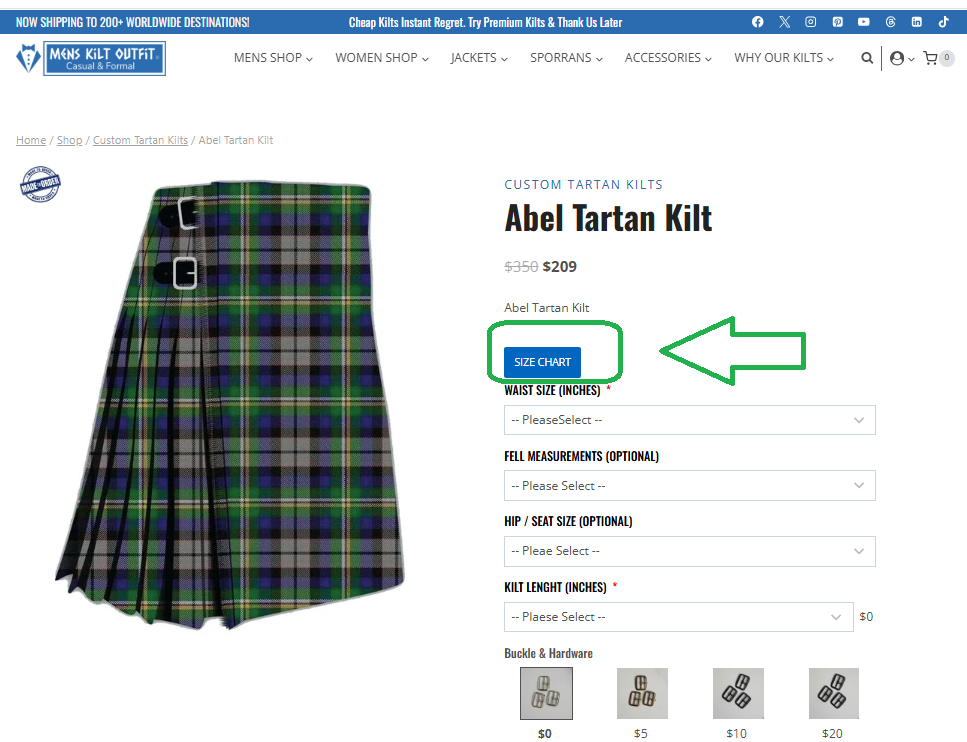
You can find the SIZE CHART directly on the product page, usually below the product name and above the customization options.
If you cannot find it there, you can also access our Size Chart and Measurement Video from the website footer.
Take a few minutes to check the guide and follow the measurement instructions carefully before placing your order. This is especially important when ordering a custom-made kilt or complete kilt outfit.
2. Select the Correct Tartan
If your product offers tartan selection, click on the tartan swatch you prefer. The tartan name will appear when you select the swatch, so you can confirm that you have chosen the correct tartan.
3. Double-Check Your Measurements
Before clicking Add to Cart, review your waist measurement, kilt length, and any other required measurements.
For custom products, accurate measurements are important for getting the best possible fit.
4. Review Your Add-Ons
Some products include optional add-ons such as matching sporrans, fly plaids, belt buckles, or different kilt options.
Only select the options you need, and check your selections before adding the product to your cart.
5. Use an Active Email Address
Always enter an email address that you personally use and check regularly.
Your order confirmation, customization questions, stock updates, dispatch information, tracking details, and other important order communications may be sent to this email address.
Avoid using fake, temporary, or rarely checked email addresses.
6. Check Everything Before Checkout
Before completing your order, take one final look at your:
Tartan → Size → Measurements → Add-Ons → Accessories → Shipping Address → Phone Number → Email Address
A quick final check can help prevent mistakes and make the ordering process much smoother.